

Superhuman ships with a handy default VIP split inbox. If you combine that with Superhuman’s ability to receive notifications (especially mobile notifications) for specific splits only, it’s a great way to make sure you never miss messages from important senders.
The problem is that Superhuman doesn’t currently let you mark an individual thread as something you want to be notified about.
This comes up for me all the time. I’ll be part of a thread where I really want to know the moment someone replies — but I don’t want to go through the hassle of temporarily adding every sender on that thread to my VIP list.
Hey.com, another email service does support notifications per thread, and I suspect this is a feature many Superhuman users would appreciate natively. Until that happens, though, there’s a simple workaround.
To set it up, you’ll want to do four things:
Create a label in Gmail (I call mine “following”)
Set up a Superhuman split for that “following” label
Turn on mobile notifications for the “following” split inbox (see image below)
Apply the “following” label to any thread you want notifications for
That’s it.
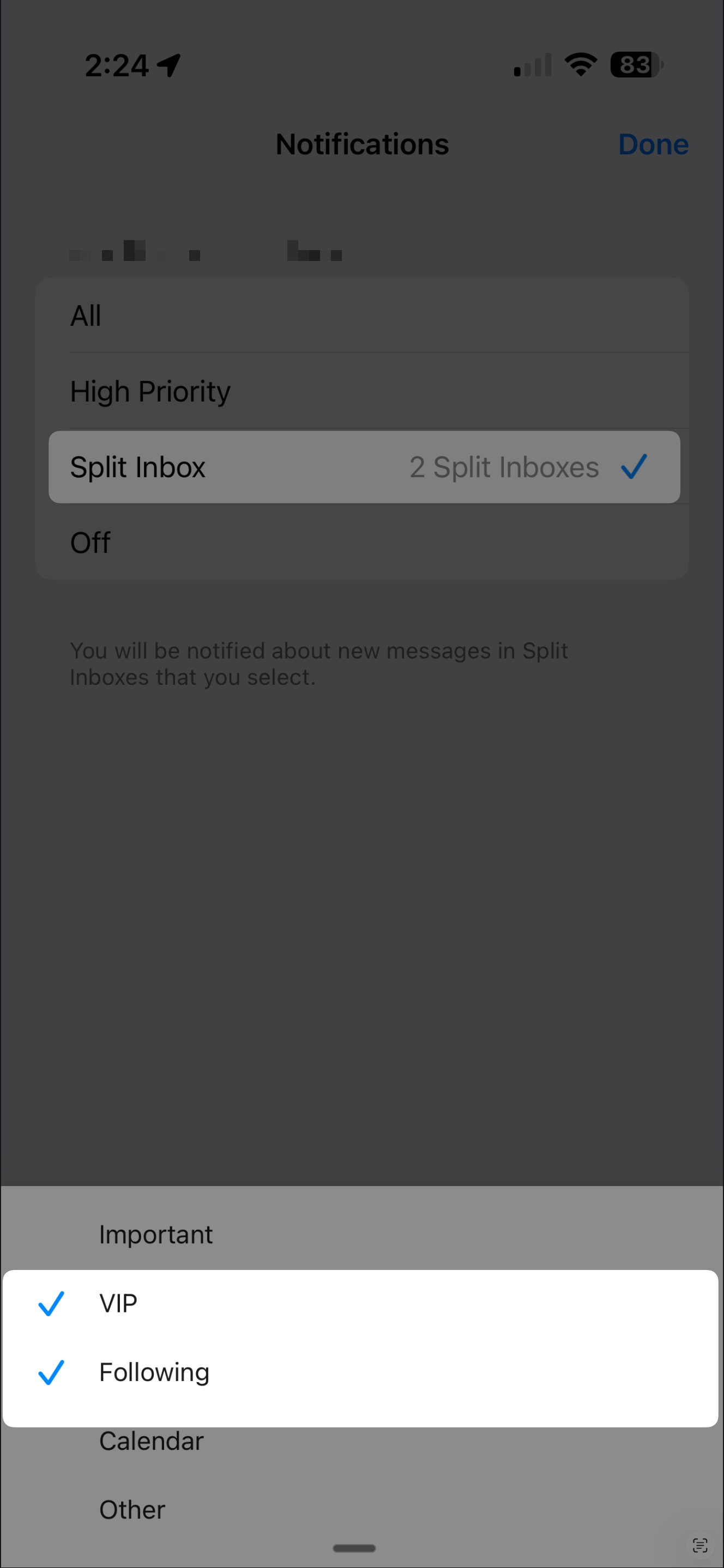
Any time there’s a reply on a thread you’ve labeled “following,” you’ll get notified — without changing your broader notification or VIP settings.
This is especially useful for short-term situations like contract negotiations, scheduling threads, or time-sensitive approvals.
I do wish Superhuman offered this natively, but until they do, I hope this workaround is helpful.